
 Arthas基础使用
AI 整理版
本篇已整理为更适合学习与复习的笔记结构,欢迎前往阅读:Arthas基础使用-AI整理版。
官网地址: arthas (aliyun.com)
Gitee:arthas: Arthas(阿尔萨斯)是阿里巴巴开源的 Java 诊断工具 (gitee.com)
GitHub: GitHub - alibaba/arthas: Alibaba Java Diagnostic Tool Arthas/Alibaba Java诊断利器Arthas
安装
Windows安装
cmd里通过curl指令下载:
curl -O https://alibaba.github.io/arthas/arthas-boot.jar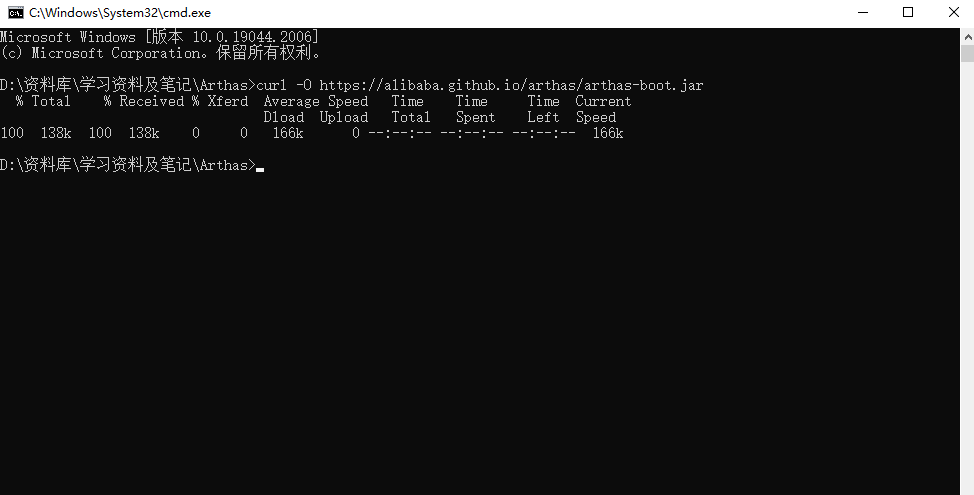
启动一个java程序,然后通过指令: java -jar arthas-boot.jar 启动可以得到如下图:

选择1,程序会进行arthas相关资源下载,如下图:
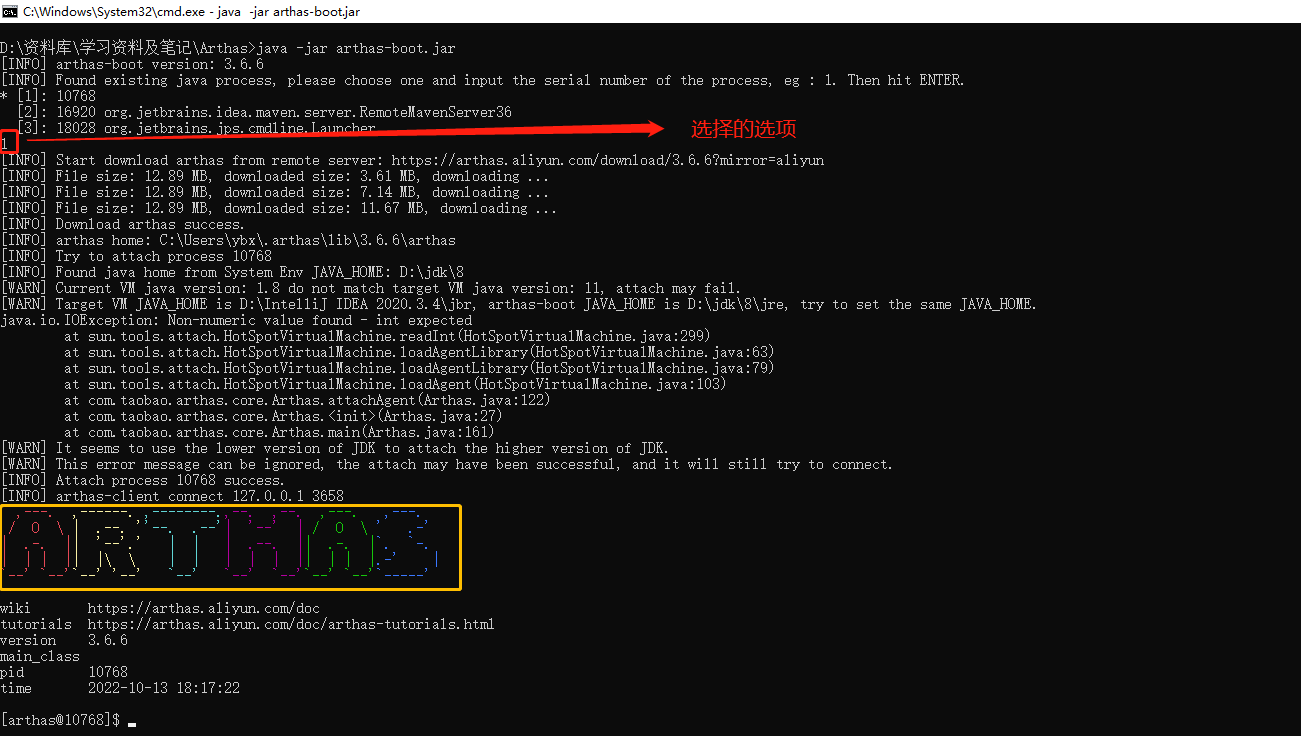
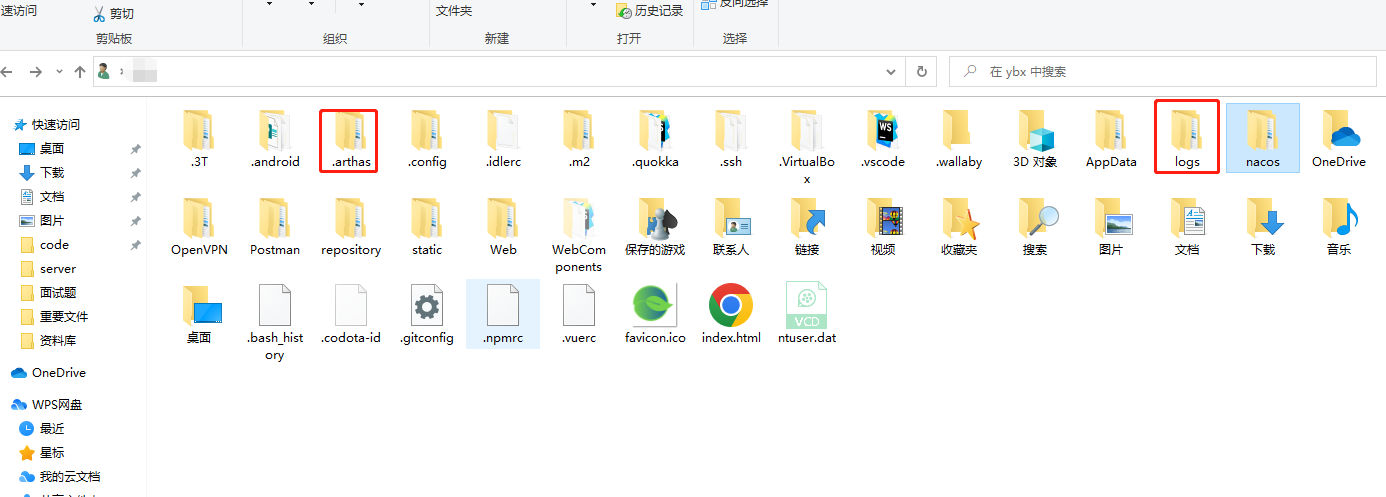
出现黄框,就可以在C盘用户目录下发现两个文件夹,分别是 .arthas 和 logs ,如下图:
Linux(Ubuntu安装)
下载 arthas-boot.jar 指令:
curl -O https://alibaba.github.io/arthas/arthas-boot.jar可能会提示需要安装curl,
安装指令:
apt install curl如果出现
- 完美解决“无法获得锁 /var/lib/dpkg/lock-frontend - open (11: 资源暂时不可用)
- 无法获取 dpkg 前端锁 (/var/lib/dpkg/lock-f”的问题
通过指令查询apt进程:
ps -e | grep apt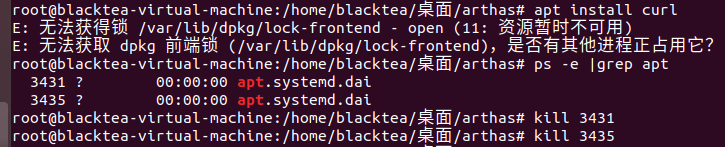
注意: 杀死进程后有可能出现新的进程,所以在杀死进程后再次查询apt进程,确保所有apt不在有进程运行。
杀死所有进程后就可以再安装curl了,如下图就安装成功了。
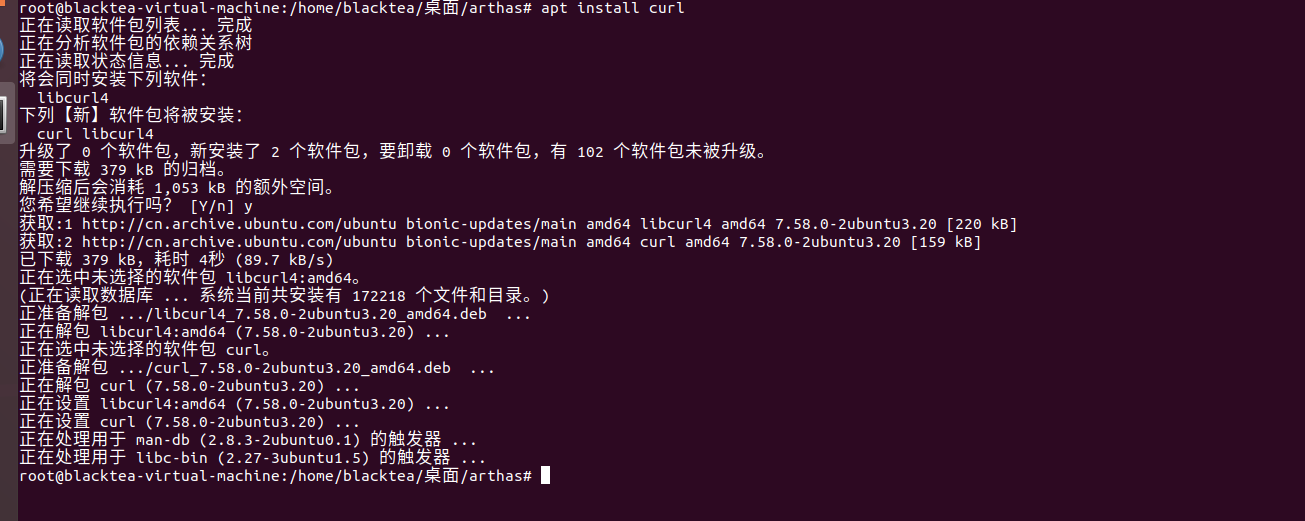
再次下载 arthas-boot.jar

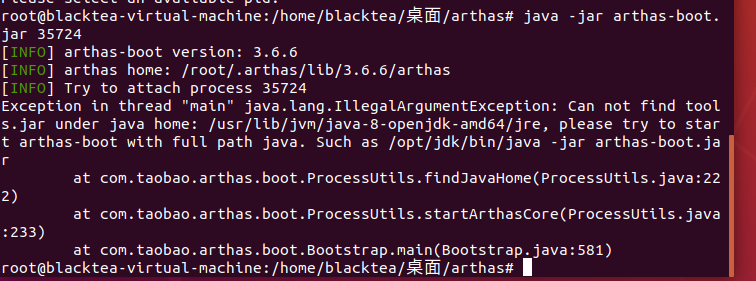
注意: 启动 arthas-boot.jar会出现找不到进程的情况,需要在指令后面加上你需要进行监控的进程ID,例如:
java -jar arthas-boot.jar 35724它就会进行下载arthas的资源包,如下图:
arthas 资源位置: /root/.arthas/lib/3.6.6/arthas
因为我是使用root用户进行操作的,所以在root目录下生成了一个 .arthas 的隐藏目录。

但是我的环境因为之前只是拿来跑程序的,所以只安装了一个jre没有安装jdk,所以它报出缺少 tools.jar ,我们重新装下jdk就好了,
我的jre资源位置:/usr/lib/jvm/java-8-openjdk-amd64
下载jdk指令:
apt install openjdk-8-jdk注意:这里的下载最好是在与jre相同的目录下进行,否则很可能需要重新进行java配置。
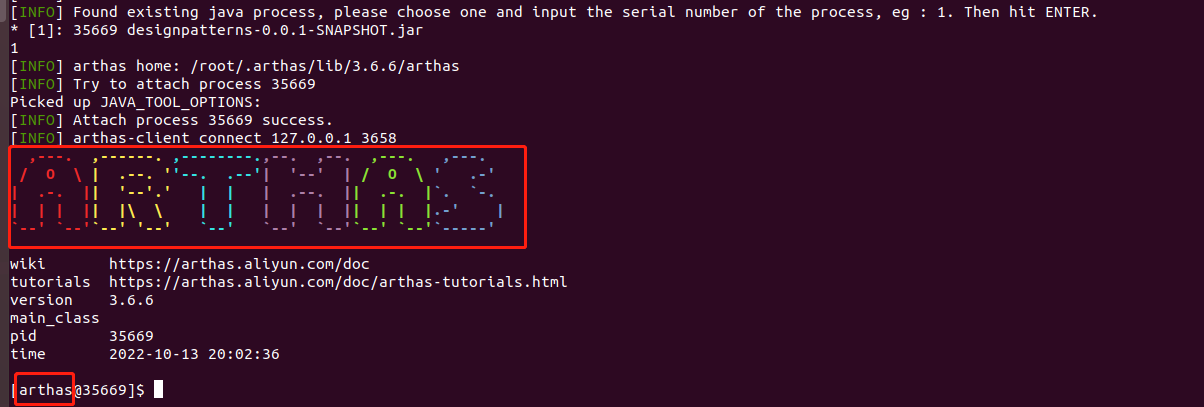
重新进行arthas启动指令,得到如下图片内容:

出现进程选择即表示成功。
选择 1 进程,展示出现 ARTHAS 图标和 arthas用户前缀 就表示监听进程成功。
离线安装
github 下载地址:下载 | arthas (aliyun.com)
maven 下载地址: 下载 | arthas (maven)
离线文档下载地址: 下载 | arthas (离线文档)
卸载
直接删除 arthas 相关的资源包就可以了。
快速入门
先安装一个 math-game ,官网用例,是一个简单的程序,每隔一秒生成一个随机数,再执行质因数分解,并打印出分解结果。
下载指令:
curl -O https://arthas.aliyun.com/math-game.jar启动 math-game.jar 指令:
java -jar math-game.jar再启动 arthas-boot.jar 指令:
java -jar arthas-boot.jar然后选择选项1开始监控。
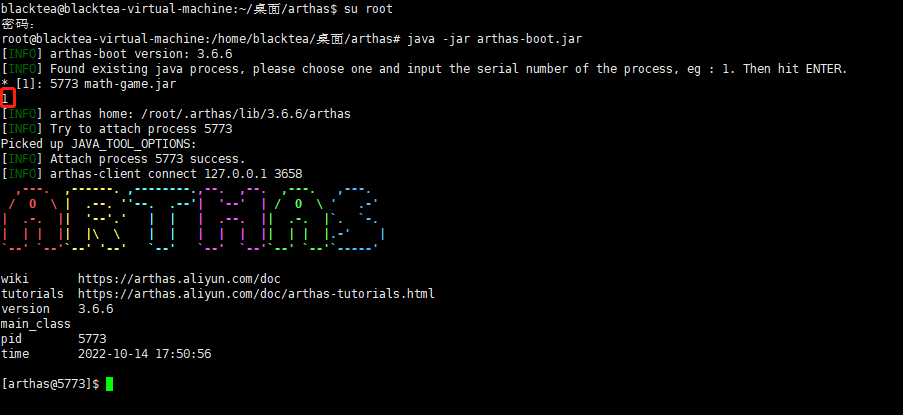
如果端口冲突了,例如以下:
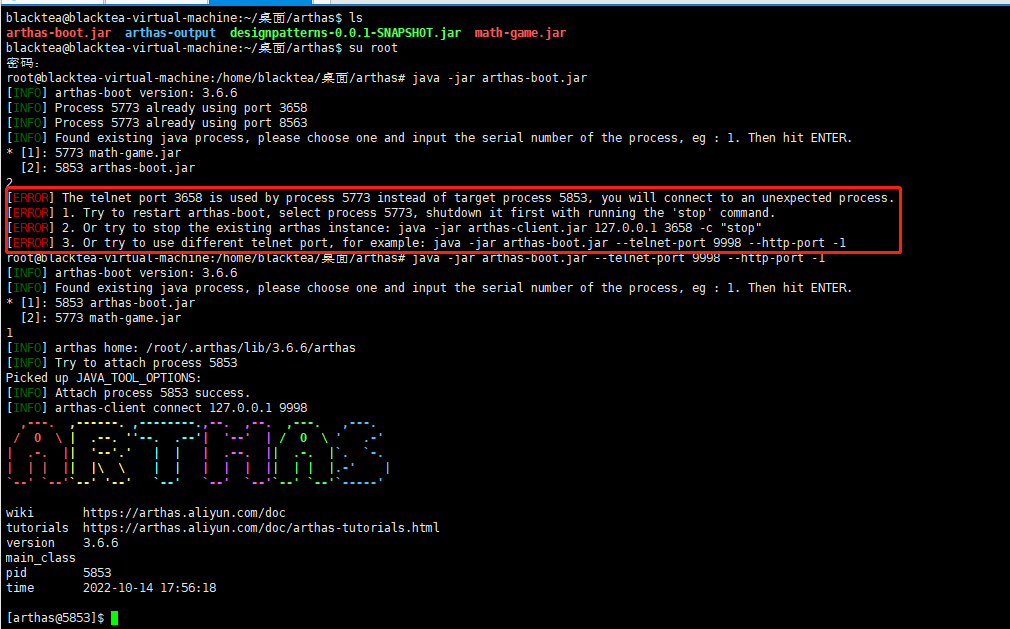
可以通过指令更改端口启动:
java -jar arthas-boot.jar --telnet-port 9998 --http-port -1启动成功后可以通过浏览器访问 arthas 控制台
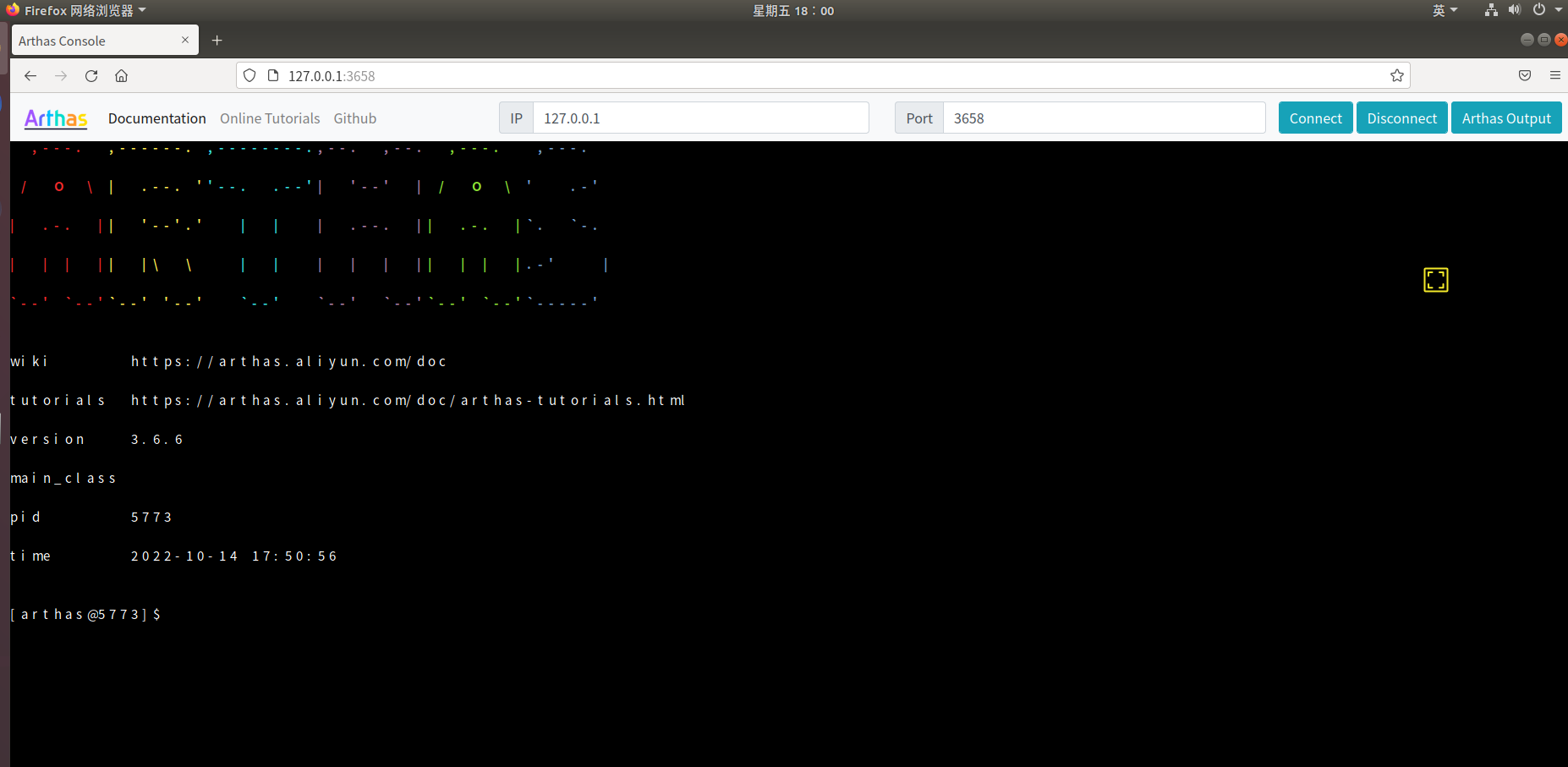
浏览器地址通过启动arthas监控的时候可以得到。
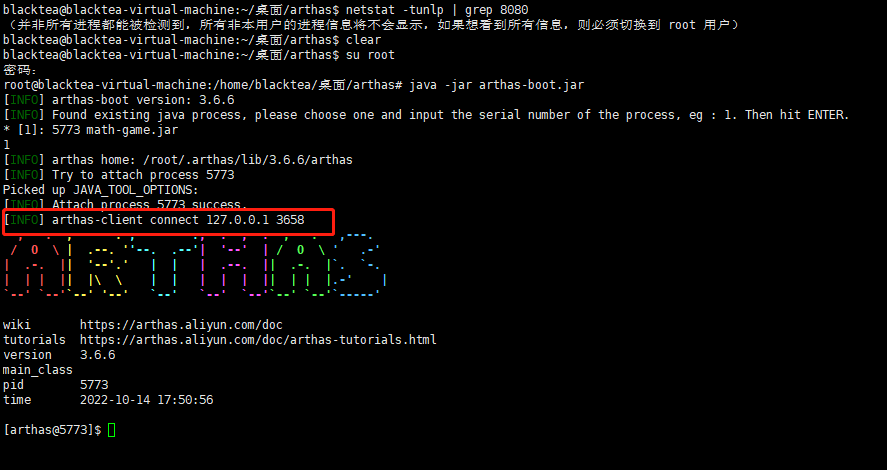
基础命令行
dashboard(仪表板)
官网文档地址:https://arthas.aliyun.com/doc/dashboard.html
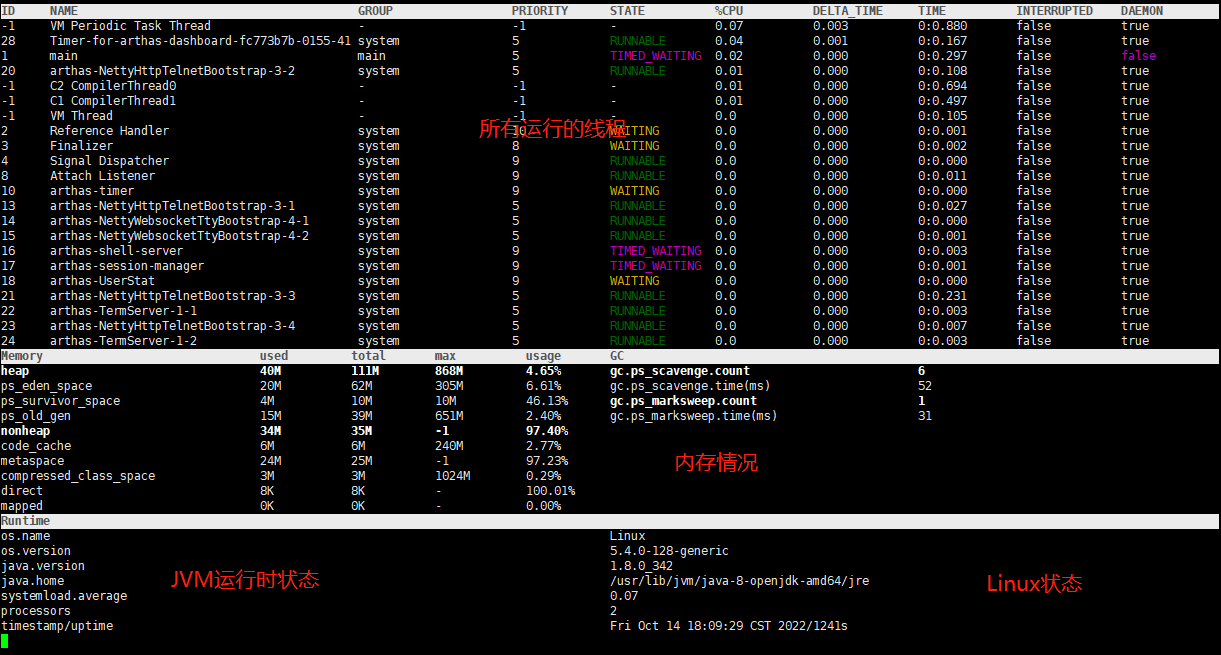
示例图片:
输入dashboard,按回车/enter,会展示当前进程的信息,按 ctrl+c 或 q 可以中断执行。
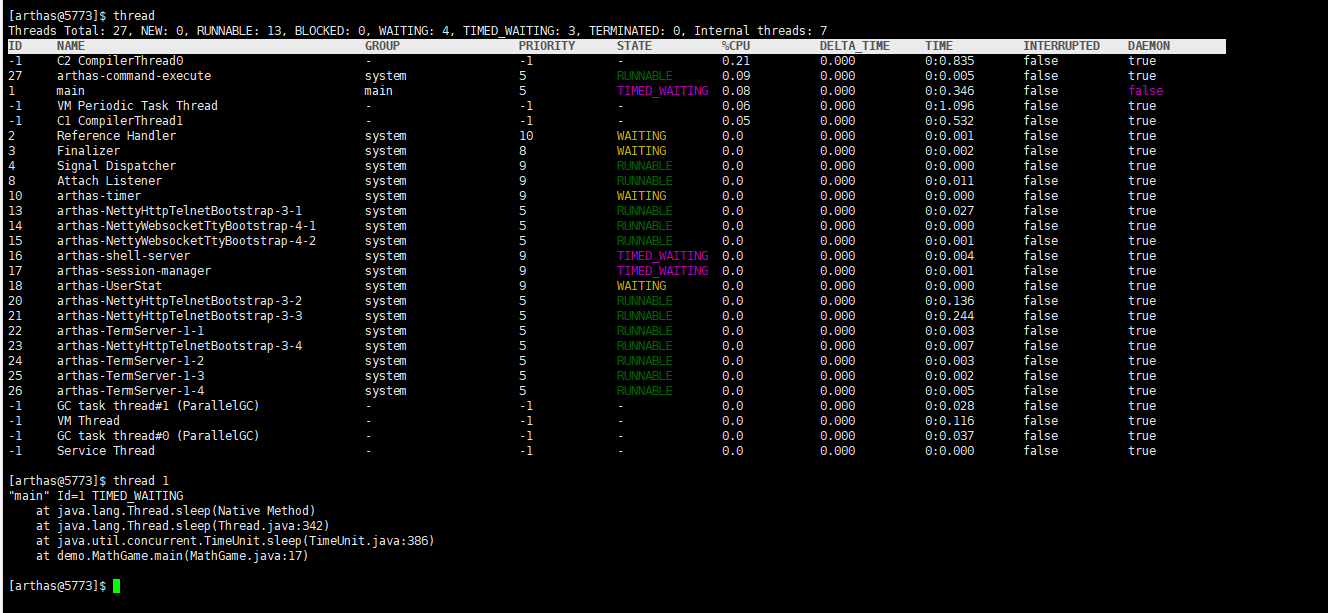
thread
官网文档地址:https://arthas.aliyun.com/doc/thread.html
示例图片:
查看当前线程信息,查看线程的堆栈
jad
官网文档地址:https://arthas.aliyun.com/doc/jad.html
示例:
通过 jad 来反编译 Main Class
指令:jad 通过包名加类名即可反编译出类
[arthas@5773]$ jad demo.MathGame

# 类加载器内容
ClassLoader:
+-sun.misc.Launcher$AppClassLoader@74a14482
  +-sun.misc.Launcher$ExtClassLoader@12a3a380
# jar包定位的位置
Location:
/home/blacktea/%e6%a1%8c%e9%9d%a2/arthas/math-game.jar
# 源代码
       /*
        * Decompiled with CFR.
        */
       package demo;

       import java.util.ArrayList;
       import java.util.List;
       import java.util.Random;
       import java.util.concurrent.TimeUnit;

       public class MathGame {
           private static Random random = new Random();
           private int illegalArgumentCount = 0;

           public List<Integer> primeFactors(int number) {
/*44*/         if (number < 2) {
/*45*/             ++this.illegalArgumentCount;
                   throw new IllegalArgumentException("number is: " + number + ", need >= 2");
               }
               ArrayList<Integer> result = new ArrayList<Integer>();
/*50*/         int i = 2;
/*51*/         while (i <= number) {
/*52*/             if (number % i == 0) {
/*53*/                 result.add(i);
/*54*/                 number /= i;
/*55*/                 i = 2;
                       continue;
                   }
/*57*/             ++i;
               }
/*61*/         return result;
           }

           public static void main(String[] args) throws InterruptedException {
               MathGame game = new MathGame();
               while (true) {
/*16*/             game.run();
/*17*/             TimeUnit.SECONDS.sleep(1L);
               }
           }

           public void run() throws InterruptedException {
               try {
/*23*/             int number = random.nextInt() / 10000;
/*24*/             List<Integer> primeFactors = this.primeFactors(number);
/*25*/             MathGame.print(number, primeFactors);
               }
               catch (Exception e) {
/*28*/             System.out.println(String.format("illegalArgumentCount:%3d, ", this.illegalArgumentCount) + e.getMessage());
               }
           }

           public static void print(int number, List<Integer> primeFactors) {
               StringBuffer sb = new StringBuffer(number + "=");
/*34*/         for (int factor : primeFactors) {
/*35*/             sb.append(factor).append('*');
               }
/*37*/         if (sb.charAt(sb.length() - 1) == '*') {
/*38*/             sb.deleteCharAt(sb.length() - 1);
               }
/*40*/         System.out.println(sb);
           }
       }

Affect(row-cnt:1) cost in 678 ms.
[arthas@5773]$
watch
官网文档地址:https://arthas.aliyun.com/doc/watch.html
示例:
通过 watch 命令来查看 demo.MathGame#primeFactors 函数的返回值:
[arthas@5773]$  watch demo.MathGame primeFactors returnObj
Press Q or Ctrl+C to abort.
Affect(class count: 1 , method count: 1) cost in 94 ms, listenerId: 1
method=demo.MathGame.primeFactors location=AtExit
ts=2022-10-14 19:07:12; [cost=0.623656ms] result=@ArrayList[
    @Integer[2],
    @Integer[2],
    @Integer[2],
    @Integer[2],
    @Integer[3],
    @Integer[3],
    @Integer[7],
    @Integer[181],
]
method=demo.MathGame.primeFactors location=AtExceptionExit
ts=2022-10-14 19:07:13; [cost=0.105696ms] result=null
method=demo.MathGame.primeFactors location=AtExceptionExit
ts=2022-10-14 19:07:14; [cost=0.038471ms] result=null
method=demo.MathGame.primeFactors location=AtExceptionExit
ts=2022-10-14 19:07:15; [cost=0.0432ms] result=null
method=demo.MathGame.primeFactors location=AtExit
ts=2022-10-14 19:07:16; [cost=0.143085ms] result=@ArrayList[
    @Integer[6637],
]
method=demo.MathGame.primeFactors location=AtExit
ts=2022-10-14 19:07:17; [cost=0.073486ms] result=@ArrayList[
    @Integer[3],
    @Integer[3],
    @Integer[5],
    @Integer[2467],
]
method=demo.MathGame.primeFactors location=AtExceptionExit
ts=2022-10-14 19:07:18; [cost=0.043811ms] result=null
method=demo.MathGame.primeFactors location=AtExit
ts=2022-10-14 19:07:19; [cost=0.036377ms] result=@ArrayList[
    @Integer[2],
    @Integer[3],
    @Integer[31],
    @Integer[691],
]
退出arthas
stop 官网文档地址:https://arthas.aliyun.com/doc/stop.html
exit 官方文档地址:https://arthas.aliyun.com/doc/quit.html
如果只是退出当前的连接,可以用quit或者exit命令。Attach 到目标进程上的 arthas 还会继续运行,端口会保持开放,下次连接时可以直接连接上。
如果想完全退出 arthas,可以执行stop命令。
help
官网文档地址:https://arthas.aliyun.com/doc/help.html
查看命令帮助信息,可以查看当前 arthas 版本支持的指令,或者查看具体指令的使用说明。
示例:
[arthas@7367]$ help
 NAME         DESCRIPTION
 help         Display Arthas Help
 auth         Authenticates the current session
 keymap       Display all the available keymap for the specified connection.
 sc           Search all the classes loaded by JVM
 sm           Search the method of classes loaded by JVM
 classloader  Show classloader info
 jad          Decompile class
 getstatic    Show the static field of a class
 monitor      Monitor method execution statistics, e.g. total/success/failure count, average rt, fail rate, etc.
 stack        Display the stack trace for the specified class and method
 thread       Display thread info, thread stack
 trace        Trace the execution time of specified method invocation.
 watch        Display the input/output parameter, return object, and thrown exception of specified method invocation
 tt           Time Tunnel
 jvm          Display the target JVM information
 memory       Display jvm memory info.
 perfcounter  Display the perf counter information.
 ognl         Execute ognl expression.
 mc           Memory compiler, compiles java files into bytecode and class files in memory.
 redefine     Redefine classes. @see Instrumentation#redefineClasses(ClassDefinition...)
 retransform  Retransform classes. @see Instrumentation#retransformClasses(Class...)
 dashboard    Overview of target jvm's thread, memory, gc, vm, tomcat info.
 dump         Dump class byte array from JVM
 heapdump     Heap dump
 options      View and change various Arthas options
 cls          Clear the screen
 reset        Reset all the enhanced classes
 version      Display Arthas version
 session      Display current session information
 sysprop      Display, and change the system properties.
 sysenv       Display the system env.
 vmoption     Display, and update the vm diagnostic options.
 logger       Print logger info, and update the logger level
 history      Display command history
 cat          Concatenate and print files
 base64       Encode and decode using Base64 representation
 echo         write arguments to the standard output
 pwd          Return working directory name
 mbean        Display the mbean information
 grep         grep command for pipes.
 tee          tee command for pipes.
 profiler     Async Profiler. https://github.com/jvm-profiling-tools/async-profiler
 vmtool       jvm tool
 stop         Stop/Shutdown Arthas server and exit the console.
 jfr          Java Flight Recorder Command
[arthas@7367]$
cat
官网文档地址:https://arthas.aliyun.com/doc/cat.html
打印文件内容,和 linux 里的 cat 命令类似。
[arthas@7519]$ cat helloArthas.txt
你好啊,arthas,很高兴认识你!


10.14号,2022年:

[arthas@7519]$
grep
官网文档地址:https://arthas.aliyun.com/doc/grep.html
类似传统的grep命令。
 USAGE:
   grep [-A <value>] [-B <value>] [-C <value>] [-h] [-i] [-v] [-n] [-m <value>] [-e] [--trim-end] pattern

 SUMMARY:
   grep command for pipes.

 EXAMPLES:
  sysprop | grep java
  sysprop | grep java -n
  sysenv | grep -v JAVA
  sysenv | grep -e "(?i)(JAVA|sun)" -m 3  -C 2
  sysenv | grep JAVA -A2 -B3
  thread | grep -m 10 -e  "TIMED_WAITING|WAITING"

 WIKI:
   https://arthas.aliyun.com/doc/grep

 OPTIONS:
 -A, --after-context <value>                                                    Print NUM lines of trailing context)
 -B, --before-context <value>                                                   Print NUM lines of leading context)
 -C, --context <value>                                                          Print NUM lines of output context)
 -h, --help                                                                     this help
 -i, --ignore-case                                                              Perform case insensitive matching.  By default, grep is case sensitive.
 -v, --invert-match                                                             Select non-matching lines
 -n, --line-number                                                              Print line number with output lines
 -m, --max-count <value>                                                        stop after NUM selected lines)
 -e, --regex                                                                    Enable regular expression to match
     --trim-end                                                                 Remove whitespaces at the end of the line
 <pattern>                                                                      Pattern
示例:
只显示java相关的系统信息。
[arthas@7519]$ sysprop | grep java -n
5: java.specification.version                     1.8
8: java.class.path                                math-game.jar
9: java.vm.vendor                                 Private Build
11: java.vendor.url                                http://java.oracle.com/
14: java.vm.specification.version                  1.8
16: sun.java.launcher                              SUN_STANDARD
17: sun.boot.library.path                          /usr/lib/jvm/java-8-openjdk-amd64/jre/lib/amd64
18: sun.java.command                               math-game.jar
22: java.specification.vendor                      Oracle Corporation
23: java.home                                      /usr/lib/jvm/java-8-openjdk-amd64/jre
26: java.vm.specification.vendor                   Oracle Corporation
27: java.specification.name                        Java Platform API Specification
28: java.awt.graphicsenv                           sun.awt.X11GraphicsEnvironment
29: sun.boot.class.path                            /usr/lib/jvm/java-8-openjdk-amd64/jre/lib/resources.jar:/usr/lib/jvm/java-8-openjdk-amd64/jre/lib/rt.jar:/usr/lib/jvm/java-8-openjdk-amd64/jre/lib/sunrsasign.jar:/usr/lib/jvm/java-8-ope
30:                                                njdk-amd64/jre/lib/jsse.jar:/usr/lib/jvm/java-8-openjdk-amd64/jre/lib/jce.jar:/usr/lib/jvm/java-8-openjdk-amd64/jre/lib/charsets.jar:/usr/lib/jvm/java-8-openjdk-amd64/jre/lib/jfr.jar:/u
31:                                                sr/lib/jvm/java-8-openjdk-amd64/jre/classes
33: java.runtime.version                           1.8.0_342-8u342-b07-0ubuntu1~18.04-b07
37: java.endorsed.dirs                             /usr/lib/jvm/java-8-openjdk-amd64/jre/lib/endorsed
38: java.runtime.name                              OpenJDK Runtime Environment
40: java.vm.name                                   OpenJDK 64-Bit Server VM
41: java.vendor.url.bug                            http://bugreport.sun.com/bugreport/
42: java.io.tmpdir                                 /tmp
43: java.version                                   1.8.0_342
46: java.vm.specification.name                     Java Virtual Machine Specification
47: java.awt.printerjob                            sun.print.PSPrinterJob
49: java.library.path                              /usr/java/packages/lib/amd64:/usr/lib/x86_64-linux-gnu/jni:/lib/x86_64-linux-gnu:/usr/lib/x86_64-linux-gnu:/usr/lib/jni:/lib:/usr/lib
50: java.vm.info                                   mixed mode
51: java.vendor                                    Private Build
52: java.vm.version                                25.342-b07
53: java.ext.dirs                                  /usr/lib/jvm/java-8-openjdk-amd64/jre/lib/ext:/usr/java/packages/lib/ext
55: java.class.version                             52.0
[arthas@7519]$
pwd
官网文档地址:https://arthas.aliyun.com/doc/pwd.html
返回当前的工作目录,和 linux 命令类似
示例:
[arthas@7519]$ pwd
/home/blacktea/桌面/arthas
[arthas@7519]$
cls
官网文档地址:https://arthas.aliyun.com/doc/cls.html
清空当前屏幕区域。
提示
非终端模式下使用 cls 指令,会提示"Command 'cls' is only support tty session."
session
官网文档地址:https://arthas.aliyun.com/doc/session.html
查看当前会话的信息,显示当前绑定的 pid 以及会话 id。
提示
如果配置了 tunnel server,会追加打印 代理 id、tunnel 服务器的 url 以及连接状态。
如果使用了 staturl 做统计,会追加显示 statUrl 地址。
[arthas@7519]$ session
 Name        Value
--------------------------------------------------
 JAVA_PID    7519
 SESSION_ID  919c02a3-a0f0-4e07-afd9-5a865c165ad5
[arthas@7519]$
reset
官网文档地址:https://arthas.aliyun.com/doc/reset.html
重置增强类,将被 Arthas 增强过的类全部还原,Arthas 服务端stop时会重置所有增强过的类
version
官网文档地址:https://arthas.aliyun.com/doc/version.html
输出当前目标 Java 进程所加载的 Arthas 版本号
history
官网文档地址:https://arthas.aliyun.com/doc/history.html
打印命令历史。
提示
历史指令会通过一个名叫 history 的文件持久化,所以 history 指令可以查看当前 arthas 服务器的所有历史命令,而不仅只是当前次会话使用过的命令。
| 参数名称 | 参数说明 |
|---|---|
| [c:] | 清空历史指令 |
| [n:] | 显示最近执行的 n 条指令 |
示例:
显示历史最近10条记录。
[arthas@7519]$ history 10
   28  cls
   29  sysprop | grep java -n
   30  sysprop | grep java -n -m 10
   31  sysprop | grep java -n -m1
   32  sysprop | grep java -n -m 2
   33  cls
   34  pwd
   35  cls
   36  session
   37  history 10
[arthas@7519]$
清空历史记录。
[arthas@7519]$ history -c
[arthas@7519]$ history 10
    1  history 10
keymap
官网文档地址:https://arthas.aliyun.com/doc/keymap.html
keymap命令输出当前的快捷键映射表:默认的快捷键如下:
| 快捷键 | 快捷键说明 | 命令名称 | 命令说明 |
|---|---|---|---|
"\C-a" | ctrl + a | beginning-of-line | 跳到行首 |
"\C-e" | ctrl + e | end-of-line | 跳到行尾 |
"\C-f" | ctrl + f | forward-word | 向前移动一个单词 |
"\C-b" | ctrl + b | backward-word | 向后移动一个单词 |
"\e[D" | 键盘左方向键 | backward-char | 光标向前移动一个字符 |
"\e[C" | 键盘右方向键 | forward-char | 光标向后移动一个字符 |
"\e[B" | 键盘下方向键 | next-history | 下翻显示下一个命令 |
"\e[A" | 键盘上方向键 | previous-history | 上翻显示上一个命令 |
"\C-h" | ctrl + h | backward-delete-char | 向后删除一个字符 |
"\C-?" | ctrl + shift + / | backward-delete-char | 向后删除一个字符 |
"\C-u" | ctrl + u | undo | 撤销上一个命令,相当于清空当前行 |
"\C-d" | ctrl + d | delete-char | 删除当前光标所在字符 |
"\C-k" | ctrl + k | kill-line | 删除当前光标到行尾的所有字符 |
"\C-i" | ctrl + i | complete | 自动补全,相当于敲TAB |
"\C-j" | ctrl + j | accept-line | 结束当前行,相当于敲回车 |
"\C-m" | ctrl + m | accept-line | 结束当前行,相当于敲回车 |
"\C-w" | backward-delete-word | ||
"\C-x\e[3~" | backward-kill-line | ||
"\e\C-?" | backward-kill-word |
- 任何时候
tab键,会根据当前的输入给出提示 - 命令后敲
-或--,然后按tab键,可以展示出此命令具体的选项
JVM相关命令
dashboard
官方文档地址:https://arthas.aliyun.com/doc/dashboard.html
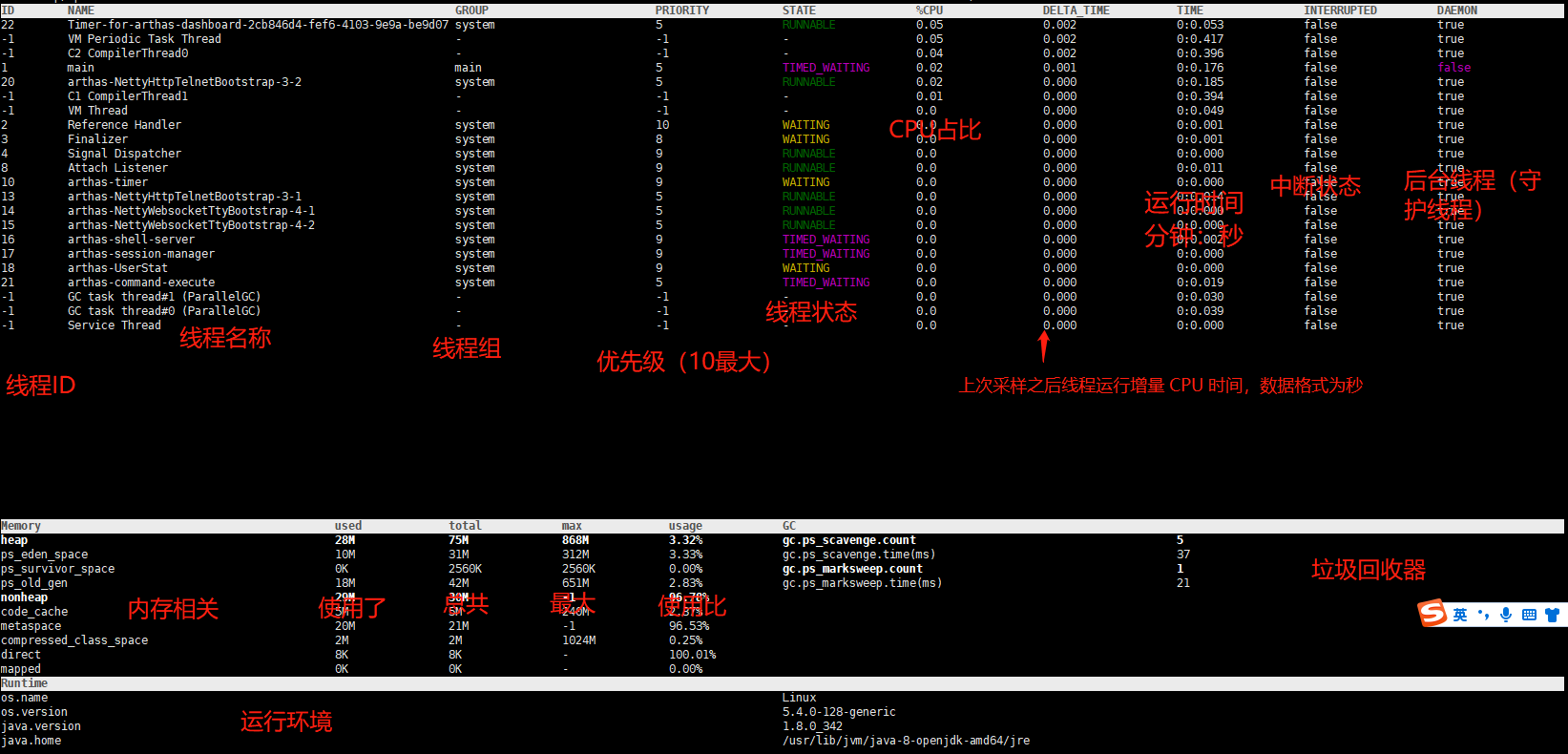
数据说明
- ID: Java 级别的线程 ID,注意这个 ID 不能跟 jstack 中的 nativeID 一一对应。
- NAME: 线程名
- GROUP: 线程组名
- PRIORITY: 线程优先级, 1~10 之间的数字,越大表示优先级越高
- STATE: 线程的状态
- CPU%: 线程的 cpu 使用率。比如采样间隔 1000ms,某个线程的增量 cpu 时间为 100ms,则 cpu 使用率=100/1000=10%
- DELTA_TIME: 上次采样之后线程运行增量 CPU 时间,数据格式为
秒 - TIME: 线程运行总 CPU 时间,数据格式为
分:秒 - INTERRUPTED: 线程当前的中断位状态
- DAEMON: 是否是 daemon 线程
thread
官方文档地址:https://arthas.aliyun.com/doc/thread.html
参数说明
| 参数名称 | 参数说明 |
|---|---|
| id | 线程 id |
| [n:] | 指定最忙的前 N 个线程并打印堆栈 |
| [b] | 找出当前阻塞其他线程的线程 |
[i <value>] | 指定 cpu 使用率统计的采样间隔,单位为毫秒,默认值为 200 |
| [--all] | 显示所有匹配的线程 |
查询处于等待状态的线程:
thread --state WAITING
jvm
官方文档地址:https://arthas.aliyun.com/doc/jvm.html
查看当前 JVM 信息
THREAD 相关
- COUNT: JVM 当前活跃的线程数
- DAEMON-COUNT: JVM 当前活跃的守护线程数
- PEAK-COUNT: 从 JVM 启动开始曾经活着的最大线程数
- STARTED-COUNT: 从 JVM 启动开始总共启动过的线程次数
- DEADLOCK-COUNT: JVM 当前死锁的线程数
文件描述符相关
- MAX-FILE-DESCRIPTOR-COUNT:JVM 进程最大可以打开的文件描述符数
- OPEN-FILE-DESCRIPTOR-COUNT:JVM 当前打开的文件描述符数
[arthas@8044]$ jvm
 RUNTIME
------------------------------------------------------------------------------------------------------------------------------------------------------------------------------------------------------------------------------------------
 MACHINE-NAME                                                       8044@blacktea-virtual-machine
 JVM-START-TIME                                                     2022-10-15 00:04:33
 MANAGEMENT-SPEC-VERSION                                            1.2
 SPEC-NAME                                                          Java Virtual Machine Specification
 SPEC-VENDOR                                                        Oracle Corporation
 SPEC-VERSION                                                       1.8
 VM-NAME                                                            OpenJDK 64-Bit Server VM
 VM-VENDOR                                                          Private Build
 VM-VERSION                                                         25.342-b07
 INPUT-ARGUMENTS                                                    []
 CLASS-PATH                                                         math-game.jar
 BOOT-CLASS-PATH                                                    /usr/lib/jvm/java-8-openjdk-amd64/jre/lib/resources.jar:/usr/lib/jvm/java-8-openjdk-amd64/jre/lib/rt.jar:/usr/lib/jvm/java-8-openjdk-amd64/jre/lib/sunrsasign.jar:/us
                                                                    r/lib/jvm/java-8-openjdk-amd64/jre/lib/jsse.jar:/usr/lib/jvm/java-8-openjdk-amd64/jre/lib/jce.jar:/usr/lib/jvm/java-8-openjdk-amd64/jre/lib/charsets.jar:/usr/lib/jvm
                                                                    /java-8-openjdk-amd64/jre/lib/jfr.jar:/usr/lib/jvm/java-8-openjdk-amd64/jre/classes
 LIBRARY-PATH                                                       /usr/java/packages/lib/amd64:/usr/lib/x86_64-linux-gnu/jni:/lib/x86_64-linux-gnu:/usr/lib/x86_64-linux-gnu:/usr/lib/jni:/lib:/usr/lib

------------------------------------------------------------------------------------------------------------------------------------------------------------------------------------------------------------------------------------------
 CLASS-LOADING
------------------------------------------------------------------------------------------------------------------------------------------------------------------------------------------------------------------------------------------
 LOADED-CLASS-COUNT                                                 3951
 TOTAL-LOADED-CLASS-COUNT                                           3951
 UNLOADED-CLASS-COUNT                                               0
 IS-VERBOSE                                                         false

------------------------------------------------------------------------------------------------------------------------------------------------------------------------------------------------------------------------------------------
 COMPILATION
------------------------------------------------------------------------------------------------------------------------------------------------------------------------------------------------------------------------------------------
 NAME                                                               HotSpot 64-Bit Tiered Compilers
 TOTAL-COMPILE-TIME                                                 1063
 [time (ms)]

------------------------------------------------------------------------------------------------------------------------------------------------------------------------------------------------------------------------------------------
 GARBAGE-COLLECTORS
------------------------------------------------------------------------------------------------------------------------------------------------------------------------------------------------------------------------------------------
 PS Scavenge                                                        name : PS Scavenge
 [count/time (ms)]                                                  collectionCount : 5
                                                                    collectionTime : 37
 PS MarkSweep                                                       name : PS MarkSweep
 [count/time (ms)]                                                  collectionCount : 1
                                                                    collectionTime : 21

------------------------------------------------------------------------------------------------------------------------------------------------------------------------------------------------------------------------------------------
 MEMORY-MANAGERS
------------------------------------------------------------------------------------------------------------------------------------------------------------------------------------------------------------------------------------------
 CodeCacheManager                                                   Code Cache
 Metaspace Manager                                                  Metaspace
                                                                    Compressed Class Space
 PS Scavenge                                                        PS Eden Space
                                                                    PS Survivor Space
 PS MarkSweep                                                       PS Eden Space
                                                                    PS Survivor Space
                                                                    PS Old Gen

------------------------------------------------------------------------------------------------------------------------------------------------------------------------------------------------------------------------------------------
 MEMORY
------------------------------------------------------------------------------------------------------------------------------------------------------------------------------------------------------------------------------------------
 HEAP-MEMORY-USAGE                                                  init : 65011712(62.0 MiB)
 [memory in bytes]                                                  used : 40636872(38.8 MiB)
                                                                    committed : 79167488(75.5 MiB)
                                                                    max : 910163968(868.0 MiB)
 NO-HEAP-MEMORY-USAGE                                               init : 2555904(2.4 MiB)
 [memory in bytes]                                                  used : 31325976(29.9 MiB)
                                                                    committed : 32096256(30.6 MiB)
                                                                    max : -1(-1 B)
 PENDING-FINALIZE-COUNT                                             0

------------------------------------------------------------------------------------------------------------------------------------------------------------------------------------------------------------------------------------------
 OPERATING-SYSTEM
------------------------------------------------------------------------------------------------------------------------------------------------------------------------------------------------------------------------------------------
 OS                                                                 Linux
 ARCH                                                               amd64
 PROCESSORS-COUNT                                                   2
 LOAD-AVERAGE                                                       0.09
 VERSION                                                            5.4.0-128-generic

------------------------------------------------------------------------------------------------------------------------------------------------------------------------------------------------------------------------------------------
 THREAD
------------------------------------------------------------------------------------------------------------------------------------------------------------------------------------------------------------------------------------------
 COUNT                                                              14
 DAEMON-COUNT                                                       13
 PEAK-COUNT                                                         15
 STARTED-COUNT                                                      18
 DEADLOCK-COUNT                                                     0

------------------------------------------------------------------------------------------------------------------------------------------------------------------------------------------------------------------------------------------
 FILE-DESCRIPTOR
------------------------------------------------------------------------------------------------------------------------------------------------------------------------------------------------------------------------------------------
 MAX-FILE-DESCRIPTOR-COUNT                                          1048576
 OPEN-FILE-DESCRIPTOR-COUNT                                         74

[arthas@8044]$
sysprop
官方文档地址:https://arthas.aliyun.com/doc/sysprop.html
使用参考
查看当前 JVM 的系统属性(System Property)
USAGE:
   sysprop [-h] [property-name] [property-value]

 SUMMARY:
   Display, and change all the system properties.

 EXAMPLES:
 sysprop
 sysprop file.encoding
 sysprop production.mode true

 WIKI:
   https://arthas.aliyun.com/doc/sysprop

 OPTIONS:
 -h, --help                                  this help
 <property-name>                             property name
 <property-value>                            property value
查看所有属性
[arthas@8044]$ sysprop
 KEY                                            VALUE
------------------------------------------------------------------------------------------------------------------------------------------------------------------------------------------------------------------------------------------
 awt.toolkit                                    sun.awt.X11.XToolkit
 file.encoding.pkg                              sun.io
 java.specification.version                     1.8
 sun.cpu.isalist
 sun.jnu.encoding                               UTF-8
 java.class.path                                math-game.jar
 java.vm.vendor                                 Private Build
 sun.arch.data.model                            64
 java.vendor.url                                http://java.oracle.com/
 user.timezone                                  Asia/Shanghai
 os.name                                        Linux
 java.vm.specification.version                  1.8
 user.country                                   CN
 sun.java.launcher                              SUN_STANDARD
 sun.boot.library.path                          /usr/lib/jvm/java-8-openjdk-amd64/jre/lib/amd64
 sun.java.command                               math-game.jar
 sun.cpu.endian                                 little
 user.home                                      /root
 user.language                                  zh
 java.specification.vendor                      Oracle Corporation
 java.home                                      /usr/lib/jvm/java-8-openjdk-amd64/jre
 file.separator                                 /
 line.separator
 java.vm.specification.vendor                   Oracle Corporation
 java.specification.name                        Java Platform API Specification
 java.awt.graphicsenv                           sun.awt.X11GraphicsEnvironment
 sun.boot.class.path                            /usr/lib/jvm/java-8-openjdk-amd64/jre/lib/resources.jar:/usr/lib/jvm/java-8-openjdk-amd64/jre/lib/rt.jar:/usr/lib/jvm/java-8-openjdk-amd64/jre/lib/sunrsasign.jar:/usr/lib/jvm/java-8-ope
                                                njdk-amd64/jre/lib/jsse.jar:/usr/lib/jvm/java-8-openjdk-amd64/jre/lib/jce.jar:/usr/lib/jvm/java-8-openjdk-amd64/jre/lib/charsets.jar:/usr/lib/jvm/java-8-openjdk-amd64/jre/lib/jfr.jar:/u
                                                sr/lib/jvm/java-8-openjdk-amd64/jre/classes
 sun.management.compiler                        HotSpot 64-Bit Tiered Compilers
 java.runtime.version                           1.8.0_342-8u342-b07-0ubuntu1~18.04-b07
 user.name                                      root
 path.separator                                 :
 os.version                                     5.4.0-128-generic
 java.endorsed.dirs                             /usr/lib/jvm/java-8-openjdk-amd64/jre/lib/endorsed
 java.runtime.name                              OpenJDK Runtime Environment
 file.encoding                                  UTF-8
 java.vm.name                                   OpenJDK 64-Bit Server VM
 java.vendor.url.bug                            http://bugreport.sun.com/bugreport/
 java.io.tmpdir                                 /tmp
 java.version                                   1.8.0_342
 user.dir                                       /home/blacktea/桌面/arthas
 os.arch                                        amd64
 java.vm.specification.name                     Java Virtual Machine Specification
 java.awt.printerjob                            sun.print.PSPrinterJob
 sun.os.patch.level                             unknown
 java.library.path                              /usr/java/packages/lib/amd64:/usr/lib/x86_64-linux-gnu/jni:/lib/x86_64-linux-gnu:/usr/lib/x86_64-linux-gnu:/usr/lib/jni:/lib:/usr/lib
 java.vm.info                                   mixed mode
 java.vendor                                    Private Build
 java.vm.version                                25.342-b07
 java.ext.dirs                                  /usr/lib/jvm/java-8-openjdk-amd64/jre/lib/ext:/usr/java/packages/lib/ext
 sun.io.unicode.encoding                        UnicodeLittle
 java.class.version                             52.0
[arthas@8044]$
查看单个属性
[arthas@8044]$ sysprop java.version
 KEY                                            VALUE
------------------------------------------------------------------------------------------------------------------------------------------------------------------------------------------------------------------------------------------
 java.version                                   1.8.0_342
[arthas@8044]$
修改单个属性
[arthas@8044]$ sysprop user.country CN
Successfully changed the system property.
 KEY                                            VALUE
------------------------------------------------------------------------------------------------------------------------------------------------------------------------------------------------------------------------------------------
 user.country                                   CN
[arthas@8044]$
sysenv
官方文档地址:https://arthas.aliyun.com/doc/sysenv.html
查看当前 JVM 的环境属性(System Environment Variables)
使用参考
 USAGE:
   sysenv [-h] [env-name]

 SUMMARY:
   Display the system env.

 EXAMPLES:
   sysenv
   sysenv USER

 WIKI:
   https://arthas.aliyun.com/doc/sysenv

 OPTIONS:
 -h, --help                                                 this help
 <env-name>
查看所有环境变量
[arthas@2951]$ sysenv
 KEY                                VALUE
------------------------------------------------------------------------------------------------------------------------------------------------------------------------------
 PATH                               /usr/local/sbin:/usr/local/bin:/usr/sbin:/usr/bin:/sbin:/bin:/usr/games:/usr/local/games:/snap/bin
 LESSCLOSE                          /usr/bin/lesspipe %s %s
 XDG_DATA_DIRS                      /usr/local/share:/usr/share:/var/lib/snapd/desktop
 JAVA_HOME                          /usr/lib/jvm/java-8-openjdk-amd64
 TERM                               xterm
 DBUS_SESSION_BUS_ADDRESS           unix:path=/run/user/1000/bus
 LANG                               zh_CN.UTF-8
 XDG_SESSION_ID                     4
 JRE_HOME                           /usr/lib/jvm/java-8-openjdk-amd64/jre
 DISPLAY                            localhost:10.0
 MAIL                               /var/mail/root
 LOGNAME                            root
 PWD                                /home/blacktea/桌面/arthas
 _                                  /usr/bin/java
 LANGUAGE                           zh_CN:zh
 LESSOPEN                           | /usr/bin/lesspipe %s
 SHELL                              /bin/bash
 SSH_TTY                            /dev/pts/0
 SSH_CLIENT                         192.168.147.1 60370 22
 OLDPWD                             /home/blacktea
 USER                               root
 CLASSPATH                          .:/usr/lib/jvm/java-8-openjdk-amd64/lib:/usr/lib/jvm/java-8-openjdk-amd64/jre/lib:
 SSH_CONNECTION                     192.168.147.1 60370 192.168.147.122 22
 XDG_RUNTIME_DIR                    /run/user/1000
 LS_COLORS                          rs=0:di=01;34:ln=01;36:mh=00:pi=40;33:so=01;35:do=01;35:bd=40;33;01:cd=40;33;01:or=40;31;01:mi=00:su=37;41:sg=30;43:ca=30;41:tw=30;42:ow=
                                    34;42:st=37;44:ex=01;32:*.tar=01;31:*.tgz=01;31:*.arc=01;31:*.arj=01;31:*.taz=01;31:*.lha=01;31:*.lz4=01;31:*.lzh=01;31:*.lzma=01;31:*.tl
                                    z=01;31:*.txz=01;31:*.tzo=01;31:*.t7z=01;31:*.zip=01;31:*.z=01;31:*.Z=01;31:*.dz=01;31:*.gz=01;31:*.lrz=01;31:*.lz=01;31:*.lzo=01;31:*.xz
                                    =01;31:*.zst=01;31:*.tzst=01;31:*.bz2=01;31:*.bz=01;31:*.tbz=01;31:*.tbz2=01;31:*.tz=01;31:*.deb=01;31:*.rpm=01;31:*.jar=01;31:*.war=01;3
                                    1:*.ear=01;31:*.sar=01;31:*.rar=01;31:*.alz=01;31:*.ace=01;31:*.zoo=01;31:*.cpio=01;31:*.7z=01;31:*.rz=01;31:*.cab=01;31:*.wim=01;31:*.sw
                                    m=01;31:*.dwm=01;31:*.esd=01;31:*.jpg=01;35:*.jpeg=01;35:*.mjpg=01;35:*.mjpeg=01;35:*.gif=01;35:*.bmp=01;35:*.pbm=01;35:*.pgm=01;35:*.ppm
                                    =01;35:*.tga=01;35:*.xbm=01;35:*.xpm=01;35:*.tif=01;35:*.tiff=01;35:*.png=01;35:*.svg=01;35:*.svgz=01;35:*.mng=01;35:*.pcx=01;35:*.mov=01
                                    ;35:*.mpg=01;35:*.mpeg=01;35:*.m2v=01;35:*.mkv=01;35:*.webm=01;35:*.ogm=01;35:*.mp4=01;35:*.m4v=01;35:*.mp4v=01;35:*.vob=01;35:*.qt=01;35
                                    :*.nuv=01;35:*.wmv=01;35:*.asf=01;35:*.rm=01;35:*.rmvb=01;35:*.flc=01;35:*.avi=01;35:*.fli=01;35:*.flv=01;35:*.gl=01;35:*.dl=01;35:*.xcf=
                                    01;35:*.xwd=01;35:*.yuv=01;35:*.cgm=01;35:*.emf=01;35:*.ogv=01;35:*.ogx=01;35:*.aac=00;36:*.au=00;36:*.flac=00;36:*.m4a=00;36:*.mid=00;36
                                    :*.midi=00;36:*.mka=00;36:*.mp3=00;36:*.mpc=00;36:*.ogg=00;36:*.ra=00;36:*.wav=00;36:*.oga=00;36:*.opus=00;36:*.spx=00;36:*.xspf=00;36:
 SHLVL                              2
 HOME                               /root
[arthas@2951]$
查看单个环境变量
[arthas@2951]$ sysenv USER
 KEY                                VALUE
------------------------------------------------------------------------------------------------------------------------------------------------------------------------------
 USER                               root
[arthas@2951]$
vmoption
官方文档地址:https://arthas.aliyun.com/doc/vmoption.html
查看,更新 VM 诊断相关的参数
查看所有的 option
[arthas@3540]$ vmoption
 KEY                                         VALUE                                      ORIGIN                                      WRITEABLE
------------------------------------------------------------------------------------------------------------------------------------------------------------------------------
 HeapDumpBeforeFullGC                        false                                      DEFAULT                                     true
 HeapDumpAfterFullGC                         false                                      DEFAULT                                     true
 HeapDumpOnOutOfMemoryError                  false                                      DEFAULT                                     true
 HeapDumpPath                                                                           DEFAULT                                     true
 CMSAbortablePrecleanWaitMillis              100                                        DEFAULT                                     true
 CMSWaitDuration                             2000                                       DEFAULT                                     true
 CMSTriggerInterval                          -1                                         DEFAULT                                     true
 PrintGC                                     false                                      DEFAULT                                     true
 PrintGCDetails                              false                                      DEFAULT                                     true
 PrintGCDateStamps                           false                                      DEFAULT                                     true
 PrintGCTimeStamps                           false                                      DEFAULT                                     true
 PrintGCID                                   false                                      DEFAULT                                     true
 PrintClassHistogramBeforeFullGC             false                                      DEFAULT                                     true
 PrintClassHistogramAfterFullGC              false                                      DEFAULT                                     true
 PrintClassHistogram                         false                                      DEFAULT                                     true
 MinHeapFreeRatio                            0                                          DEFAULT                                     true
 MaxHeapFreeRatio                            100                                        DEFAULT                                     true
 PrintConcurrentLocks                        false                                      DEFAULT                                     true
[arthas@3540]$
查看指定的 option
[arthas@3540]$ vmoption PrintGC
 KEY                                         VALUE                                      ORIGIN                                      WRITEABLE
------------------------------------------------------------------------------------------------------------------------------------------------------------------------------
 PrintGC                                     false                                      DEFAULT                                     true
[arthas@3540]$
更新指定的 option
[arthas@3540]$ vmoption PrintGC true
Successfully updated the vm option.
 NAME     BEFORE-VALUE  AFTER-VALUE
------------------------------------
 PrintGC  false         true
[arthas@3540]$
getstatic
官方文档地址:https://arthas.aliyun.com/doc/getstatic.html
- 推荐直接使用 ognl 命令,更加灵活。
通过 getstatic 命令可以方便的查看类的静态属性。使用方法为getstatic class_name field_name
[arthas@3540]$ getstatic demo.MathGame random
field: random
@Random[
    serialVersionUID=@Long[3905348978240129619],
    seed=@AtomicLong[195428618683892],
    multiplier=@Long[25214903917],
    addend=@Long[11],
    mask=@Long[281474976710655],
    DOUBLE_UNIT=@Double[1.1102230246251565E-16],
    BadBound=@String[bound must be positive],
    BadRange=@String[bound must be greater than origin],
    BadSize=@String[size must be non-negative],
    seedUniquifier=@AtomicLong[-3282039941672302964],
    nextNextGaussian=@Double[0.0],
    haveNextNextGaussian=@Boolean[false],
    serialPersistentFields=@ObjectStreamField[][isEmpty=false;size=3],
    unsafe=@Unsafe[sun.misc.Unsafe@2601d6f8],
    seedOffset=@Long[24],
]
Affect(row-cnt:1) cost in 16 ms.
[arthas@3540]$
ognl
官方文档地址:https://arthas.aliyun.com/doc/ognl.html
执行 ognl 表达式
从 3.0.5 版本增加
参数说明
| 参数名称 | 参数说明 |
|---|---|
| express | 执行的表达式 |
[c:] | 执行表达式的 ClassLoader 的 hashcode,默认值是 SystemClassLoader |
[classLoaderClass:] | 指定执行表达式的 ClassLoader 的 class name |
| [x] | 结果对象的展开层次,默认值 1 |
#使用参考
- OGNL 特殊用法请参考:https://github.com/alibaba/arthas/issues/71在新窗口打开
- OGNL 表达式官方指南:https://commons.apache.org/proper/commons-ognl/language-guide.html
OGNL
官方文档地址:https://commons.apache.org/proper/commons-ognl/language-guide.html
调用静态函数
[arthas@3846]$ ognl '@java.lang.System@out.println("hello")'
null
获取静态类的静态字段
[arthas@3846]$ ognl '@demo.MathGame@random'
@Random[
    serialVersionUID=@Long[3905348978240129619],
    seed=@AtomicLong[70265295786481],
    multiplier=@Long[25214903917],
    addend=@Long[11],
    mask=@Long[281474976710655],
    DOUBLE_UNIT=@Double[1.1102230246251565E-16],
    BadBound=@String[bound must be positive],
    BadRange=@String[bound must be greater than origin],
    BadSize=@String[size must be non-negative],
    seedUniquifier=@AtomicLong[-3282039941672302964],
    nextNextGaussian=@Double[0.0],
    haveNextNextGaussian=@Boolean[false],
    serialPersistentFields=@ObjectStreamField[][isEmpty=false;size=3],
    unsafe=@Unsafe[sun.misc.Unsafe@743896ae],
    seedOffset=@Long[24],
]
执行多行表达式,赋值给临时变量,返回一个 List
[arthas@3846]$ ognl '#value1=@System@getProperty("java.home"), #value2=@System@getProperty("java.runtime.name"), {#value1, #value2}'
@ArrayList[
    @String[/usr/lib/jvm/java-8-openjdk-amd64/jre],
    @String[OpenJDK Runtime Environment],
]
sc
官方文档地址:https://arthas.aliyun.com/doc/sc.html
查看 JVM 已加载的类信息
“Search-Class” 的简写,这个命令能搜索出所有已经加载到 JVM 中的 Class 信息,这个命令支持的参数有 [d]、[E]、[f] 和 [x:]。
#参数说明
| 参数名称 | 参数说明 |
|---|---|
| class-pattern | 类名表达式匹配 |
| method-pattern | 方法名表达式匹配 |
| [d] | 输出当前类的详细信息,包括这个类所加载的原始文件来源、类的声明、加载的 ClassLoader 等详细信息。 如果一个类被多个 ClassLoader 所加载,则会出现多次 |
| [E] | 开启正则表达式匹配,默认为通配符匹配 |
| [f] | 输出当前类的成员变量信息(需要配合参数-d 一起使用) |
| [x:] | 指定输出静态变量时属性的遍历深度,默认为 0,即直接使用 toString 输出 |
[c:] | 指定 class 的 ClassLoader 的 hashcode |
[classLoaderClass:] | 指定执行表达式的 ClassLoader 的 class name |
[n:] | 具有详细信息的匹配类的最大数量(默认为 100) |
提示
class-pattern 支持全限定名,如 com.taobao.test.AAA,也支持 com/taobao/test/AAA 这样的格式,这样,我们从异常堆栈里面把类名拷贝过来的时候,不需要在手动把
/替换为.啦。sc 默认开启了子类匹配功能,也就是说所有当前类的子类也会被搜索出来,想要精确的匹配,请打开
options disable-sub-class true开关
使用参考
模糊搜索
[arthas@4222]$ sc demo.*
demo.MathGame
Affect(row-cnt:1) cost in 7 ms.
[arthas@4222]$
打印类的详细信息
[arthas@4222]$ sc -d demo.MathGame
 class-info        demo.MathGame
 code-source       /home/blacktea/%e6%a1%8c%e9%9d%a2/arthas/math-game.jar
 name              demo.MathGame
 isInterface       false
 isAnnotation      false
 isEnum            false
 isAnonymousClass  false
 isArray           false
 isLocalClass      false
 isMemberClass     false
 isPrimitive       false
 isSynthetic       false
 simple-name       MathGame
 modifier          public
 annotation
 interfaces
 super-class       +-java.lang.Object
 class-loader      +-sun.misc.Launcher$AppClassLoader@74a14482
                     +-sun.misc.Launcher$ExtClassLoader@12a3a380
 classLoaderHash   74a14482

Affect(row-cnt:1) cost in 14 ms.
[arthas@4222]$
打印出类的 Field 信息
[arthas@4222]$ sc -d -f demo.MathGame
 class-info        demo.MathGame
 code-source       /home/blacktea/%e6%a1%8c%e9%9d%a2/arthas/math-game.jar
 name              demo.MathGame
 isInterface       false
 isAnnotation      false
 isEnum            false
 isAnonymousClass  false
 isArray           false
 isLocalClass      false
 isMemberClass     false
 isPrimitive       false
 isSynthetic       false
 simple-name       MathGame
 modifier          public
 annotation
 interfaces
 super-class       +-java.lang.Object
 class-loader      +-sun.misc.Launcher$AppClassLoader@74a14482
                     +-sun.misc.Launcher$ExtClassLoader@12a3a380
 classLoaderHash   74a14482
 fields            name     random
                   type     java.util.Random
                   modifier private,static
                   value    java.util.Random@23c17246

                   name     illegalArgumentCount
                   type     int
                   modifier private


Affect(row-cnt:1) cost in 9 ms.
[arthas@4222]$